Data security is essential for organisations of every size. From customer information and financial records to emails, documents and business-critical systems, organisations need to ensure sensitive data is protected from unauthorised access, accidental loss and cyber threats.
But what does data security actually look like in practice? Below, we explore seven examples of data security measures businesses can use to protect their information, including Microsoft technologies that can help.
Data encryption
Encryption protects data by converting it into a format that cannot easily be read without the correct authorisation or key. It can help protect information both when it is stored and when it is being transferred.
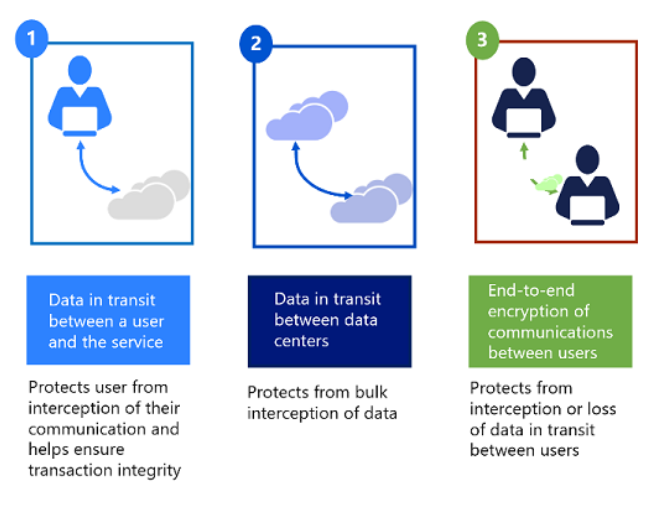
Microsoft 365, Azure and other Microsoft services provide encryption capabilities that can help organisations protect data across their cloud environment.
Multi-factor authentication
Passwords alone are no longer enough to protect business accounts. Multi-factor authentication (MFA) adds an additional layer of security by requiring users to verify their identity using another method.
Microsoft Entra ID provides identity and access management capabilities, including MFA, helping organisations reduce the risk of compromised credentials being used to access sensitive data.
Access controls and permissions
Not every employee needs access to every piece of business information. Applying appropriate permissions ensures users can access the data and resources they need without unnecessarily exposing sensitive information.
Microsoft Entra ID and Microsoft 365 can help organisations manage user access and apply policies based on factors such as users, devices and applications.
Data loss prevention
Data Loss Prevention (DLP) helps organisations identify and protect sensitive information and prevent it from being shared or transferred inappropriately. Microsoft Purview includes DLP capabilities that can help businesses protect sensitive data across Microsoft 365 and other environments.
Sensitivity labels
Sensitivity labels allow organisations to classify information based on how sensitive it is and apply appropriate protection.
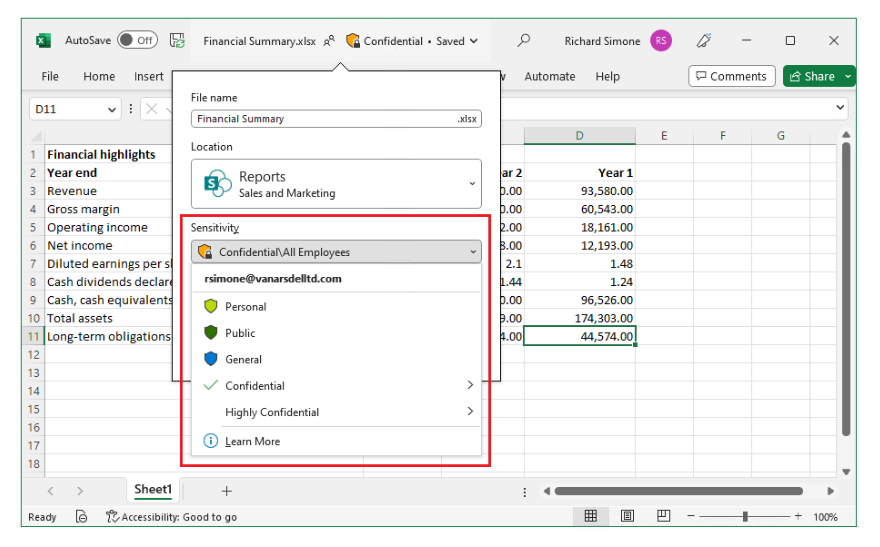
For example, a business could classify documents as ‘Public’, ‘Internal’ or ‘Confidential’, with policies controlling how sensitive information can be accessed or shared. Microsoft Purview Information Protection provides tools to help organisations classify, label and protect sensitive data.
Backup and recovery
Even with strong security controls in place, data can still be accidentally deleted, corrupted or affected by a cyber incident. Regular backups provide an additional layer of protection and can help organisations recover important information.
Microsoft Azure provides a range of backup and disaster recovery services to help protect workloads and data.
Security monitoring
Monitoring user activity, devices and systems can help organisations identify unusual behaviour and potential security incidents. Microsoft Defender and Microsoft Sentinel provide security monitoring and threat detection capabilities that can help organisations identify and respond to threats across their environment.
Protecting your business data
Effective data security is not about implementing one security measure. It requires a combination of identity protection, access controls, encryption, data classification, monitoring, backup and user awareness.
As a Microsoft Solutions partner, Bridgeall can help organisations assess their existing Microsoft environment and identify opportunities to strengthen data security using Microsoft technologies. We provide a full range of cyber security consultancy services designed to support your business at every stage of its security journey. Want to improve your organisation’s data security? Get in touch with Bridgeall to discuss your requirements.